Pank's Guestbook
GuestBook

MSN 2009 v14 綠色便攜版
MSN暫時無法使用..........
錯誤碼80040154
報告PANK兄~便攜版
MSN只要一登入就會看到(帳密都正確)
MSN暫時無法使用..........
錯誤碼80040154
試過3台都是一樣!
MSN 2009 v14 綠色便攜版
http://pank.org/blog/2012/06/portable-wlm.html
報告pank兄,不知是否能把下列中文化?
MSN 2009 v14綠色便攜版
http://www.mediafire.com/?t03ms83383y4anf
裡面有二套便攜版msn v14 喔!
可惜只有英文
請教pank兄能否中文化?
hey
I don't know you.
but I found your birthday and born location are exactly the same as mine.
what a coincidence.
I just wanna say thank you for your nice IM patch!
Hello, Pank~
一直以來都是用你的 pure MSN,
2011 的正式版已經在 18 號釋出了~
希望能趕快有 2011 的 pure 板喔^^
Hope that the patch of WLM 2011 15.4.3502.922 will be released soon...
As the final version of Windows Live Messenger 2011 (Wave 4) was released on September 30...
WLM2010
Dear Pank:
WLM 2011離線安裝檔如下
http://g.live.com/1rewlive4-all/zh-tw/wlsetup-all.exe??WLI=1
希望Pure Patch可以早日出現
謝謝
報告Pank兄, 我安裝最新的14.0.8117.416 english version後,用了Pure Patch Build 14.0.8117, msnmsgr.exe被Norton antivirus當成behave suspiciously, 請問有解決方法嗎?
是不是Pure Patch 不支援14.0.8117.416
謝謝
報告Pank兄, 我安裝最新的14.0.8117.416 english version後,用了Pure Patch Build 14.0.8117, WLM shortcut 變成 windows mail, msnmsgr.exe不見了. 請問有解決方法嗎?Pure Patch 不支援最新的14.0.8117.416?
可否幫幫忙!
謝謝
你好,想請問一下pank大大
可以另外推出沒有多開的patch嘛
現在的patch會導致win7沒版法在工作列直接改狀態(改了會另外開一個msn視窗)
我想這是多開導致的 希望pank考慮看看
你好。用了你的pure msn,感觉不错。唯一的问题就是退出后,弹出 msnmsgr.exe应用程序错误。 "0x7c9313f7"指令引用的"0x00000000"内存。该内存不能为"written"。要终止程序,请单击"确定".
这是为什么啊?
Pure MSN 14.0.8089.726是不是會有連絡人清單無法同步的問題?家裡和公司都安裝Pure MSN,在家裡加入某A....在公司登入時連絡人清單沒有某A....連訊息都不會跟家裡改的訊息一樣....反之,在公司加入某B...回家一樣沒有某B.....是不是因為Pure離線版的關係,所以少了那些檔案或程式,所以無法同步呢?

To FYu
要單獨修改連震請用十六進位編輯器修改 msnmsgr.exe
找 8B866003000033, 修改成 33C04090909033
To cis:
「期」的確是破音字, 已修改成預設顯示ㄑㄧˊ
您好:
我想請問...(msn版本是14.0.8089.726)可以像是去廣告(修改msgsres.dll)的方式,修改連續震動嗎?? 我知道您有出版一個pure msn,不過我想試試單獨去除連續震動的限制,謝謝您 :)
Pank, 我搬到台中來了, 現在借租在中港路三段, 東海大學的台糖量販店對面, 要做 LNG 加氣站與相關公車的事業囉, 有機會見面聊吧?
玩中文化後,好多年沒見了! 呵呵
你好,在羅馬拼音查詢頁(http://pank.org/pinyin/ )輸入「期」,得到的結果似乎是ㄐ一
或許是破音字? 但這恐怕會讓一些完全不會拼音的訪客誤解
抱歉!
我很想表達感謝,但每次留言都失敗,
多試幾次又可能重覆貼...,
若又重覆了,請您海涵!
很感謝您快速的為我們解除心中的疑問。
還很貼心的為我們修改。
謝謝!
To Tiger and Gina
msnpp 被防毒軟體誤報有木馬,
請參考 http://pank.org/blog/2009/10/msnpp.html
不好意思,請問一個問題,當我下載「Pure Windows Live Messenger Build 14.0.8089.726 繁體中文版」時,防毒軟體nod32會出現有win32/clampi.F 木馬訊息,而不能下載。
我下載您的前一版msn 14.0.8064並不會有此問題。不知您可否確認一下是否真有病毒!謝謝您~!
我上網查的結果,win32/clampi.F 木馬是會使駭客從電腦內偷取機密個人資料,包括網上銀行帳戶的登入名稱和密碼。
您好:
先要感謝您無私提供很多辛勞成果。
敝人非常喜歡這裏,有很多好東西解決了在下很多煩惱。
今天 M$ 的即時通又開始叫要下新版,
所以,還是像以往般來您這兒求助。
但取得最新版後,卡巴2009說內容中有下列東西:
Backdoor.Win32.Clampi.f
而將檔案刪除隔離...。
由於卡巴也蠻常亂判斷的,
所以還是來請問一下版大是不是它又亂叫了!
敝人也不是很懂,可能問得蠻笨的,還請海涵。
謝謝!
"Uninstall Windows Live Tool" 僅會移除 Windows Live 系列的程式, Windows XP 無法登入應該有其他原因.
"Uninstall Windows Live Tool"
我用了這個程式移除 Windows Live 以後
我的 windows XP 可以正常開機 但是沒辦法登入
一登入就馬上被"自動"登出
請問該如何處理?
謝謝您的程式
PANK大我看先抵制爛妓者 關閉IM網頁一陣子吧~
問都不問 當作是他做的一樣~
http://www.nownews.com/2009/09/17/339-2507297.htm
這報導我不喜歡, 樹大招風的結果很可能導致微軟的關切,
萬一如此, 只好永遠關掉 IM 那一頁
http://www.nownews.com/2009/09/17/339-2507297.htm
PANK 大大請查看一下 這是否無斷轉載你的內容?
報告Pank兄, 我安裝最新的14.0.8089.726 english version後,用了Pure Patch Build 14.0.8089, WLM完全開啟不到. 但裝回14.0.8089.206, patch了, WLM又運作正常, 請問有解決方法嗎?
可否幫幫忙看一下是不是Pure Patch 不支援最新的14.0.8089.726
謝謝
補充一下,這個版本"14.0.8064cht"在Win7上可正常登入,功能也都很正常~
大大您好,我的OS是Win7,可是在裝完最新的14.0.8089繁體中文版之後,在登入之後過幾秒就會自動登出了,請問這有解決方法嗎?
可否請大大幫幫忙呢?~~>"
謝謝^_^
Windows Live Messenger 2009 簡體中文版裡面是英文版的錯誤已修正
Please check the Live Messenger 2009 Simplified Chinese Version, it still running Live messenger 2009 ENGLISH version after I installed the Simplified Chinese version.
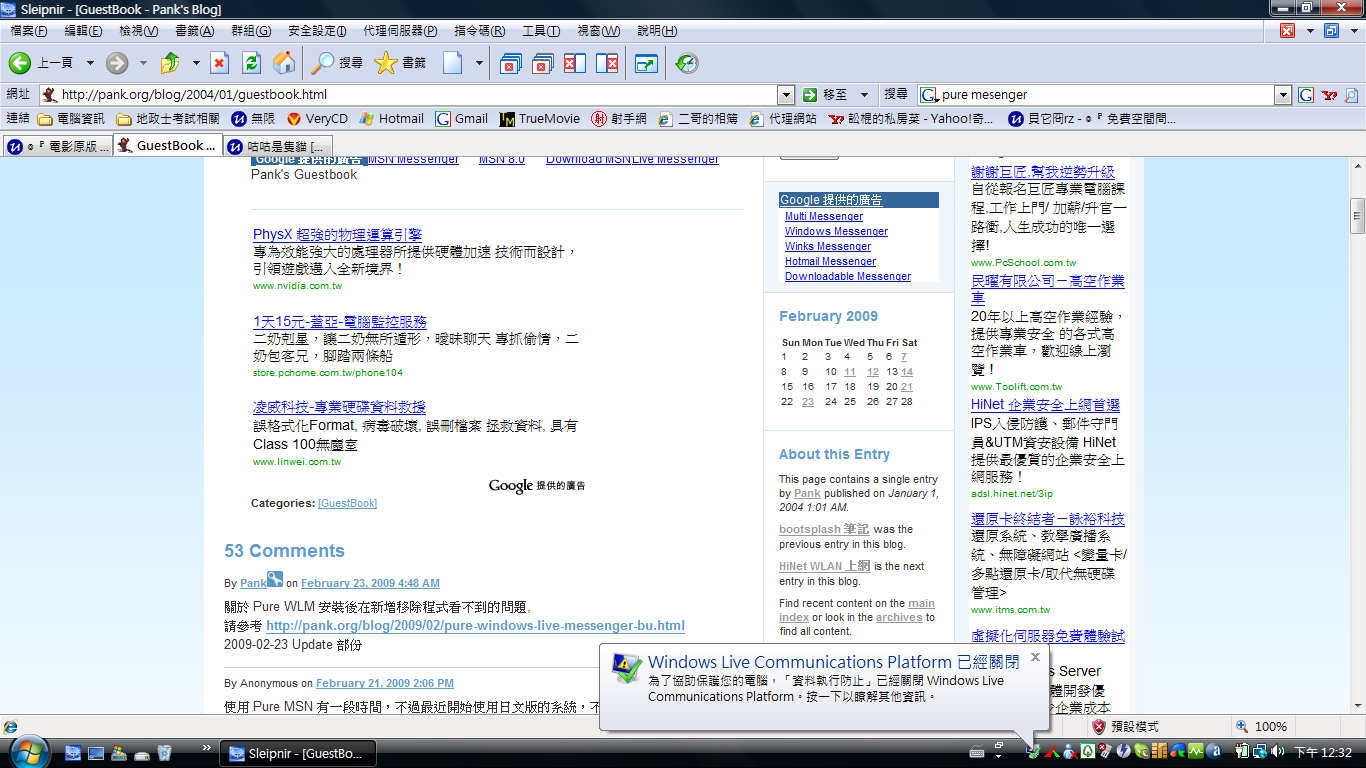
請問Windows Live Communications Platform 的問題有比較簡單一點點的解決方法嗎?
實在是有點懶得看英文@@.....
天啊~~請原諒我的懶.......
似乎有很多人遇到 Windows Live Communications Platform 關閉的問題
這篇文章有修正步驟可以參考一下
http://forum.mess.be/index.php?s=&showtopic=24117&view=findpost&p=175597
若萬一沒效, 就換回 8.5 吧
http://pank.org/ftp/im/puremsn8.5.1302cht_se.exe
http://i212.photobucket.com/albums/cc309/biohazard09o/01-1.png
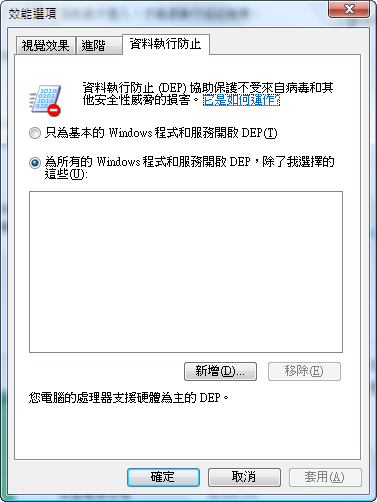
不知道是我的電腦有問題還是WLM14有問題,只要登入一段時間之後,就會自己被DEP擋掉,
DEP是這個:
http://i212.photobucket.com/albums/cc309/biohazard09o/frdg.png
請問pank大大要怎麼解決才好呢?
關於 Pure WLM 安裝後在新增移除程式看不到的問題,
請參考 http://pank.org/blog/2009/02/pure-windows-live-messenger-bu.html
2009-02-23 Update 部份
使用 Pure MSN 有一段時間,不過最近開始使用日文版的系統,不知道 Pank 可否加入日文版的 MSN 供下載?
謝謝!
你好PANK,
我試過你的安裝程式在windows server 2008使用...
我先install 14.0第一版, 最近見到你出了新板, 發覺不能更新, 老說有另一版本在電腦已安裝不能更新...
我後來上官方網站更新才可以....
另一方面, 直接安裝你provide的完全版MSN後, 新增移除程式並沒有出現MSN軟件...
希望我的report bug能另你的軟件更完美...
謝謝
To 汪:
若灌了 WLM 2009 要移除可參考
完整移除 Windows Live 2009 正式版
http://www.threesecond.info/v2/modules/xhnewbb/viewtopic.php?topic_id=1542
萬一移除還是有問題, 而想權回 8.5, 可用 Pure WLM 8.5 自解版
http://pank.org/ftp/im/puremsn8.5.1302cht_se.exe
請問一下,裝了pure版的WLM之後要怎麼移除安裝?
因為我想換回8.5的pure版卻換不回來,我卡關卡了好久了,都一直裝不回來,希望大大幫幫我,謝謝~~~>"
有大寫方便多了
多謝:)
To Aki:
「羅馬拼音查詢」增加了選項
字首大寫(預設)、全部大寫、全部小寫
To disable polygamy,
REGEDIT4
[HKEY_LOCAL_MACHINE\SOFTWARE\Microsoft\Windows Live\Messenger]
"MultipleInstances"=dword:00000000
ref. http://pank.org/blog/2008/12/enable-polygamy-in-windows-liv.html
Hello,
I would like to ask if it is possible to disable only polygamy after applying the pure patch.
Thanks
版主你好
我是"羅馬拼音查詢"的愛用者
我每次查詢, 都必須自己將字首改成大寫才看的清楚
不知道有沒有辦法讓網頁查詢出來的拼音字母能大寫呢?
您好
首先感謝您的pure patch
不過您有提到不支援Vista x64
我試過應該可以呢
只是先把MSN關掉
然後在msnpp上點右鍵選以管理員執行就好啦

MSN 2009 v14 綠色便攜版
無法使用
MSN暫時無法使用..........
錯誤碼80040154